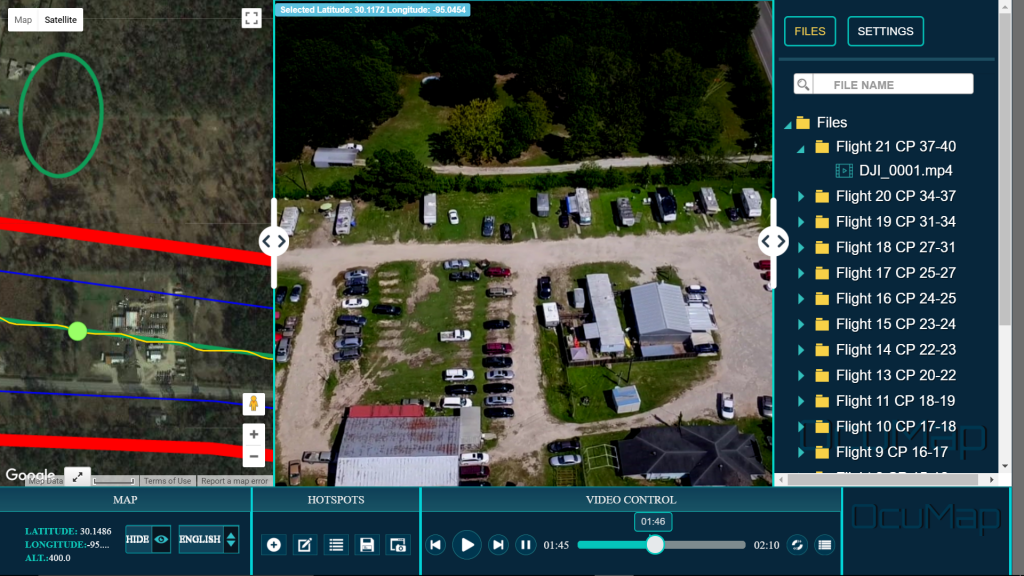

In one of OcuMap’s early corridor projects, the City of Houston tested georeferenced imagery as a faster way to document off-road drainage corridors and support condition review. The project is useful today not because every workflow remains identical, but because it demonstrated a principle that still defines OcuMap: visual documentation becomes more valuable when it remains connected to location and time.
The original challenge
The legacy project covered a large off-road ditch network that was expensive and time-consuming to assess only through conventional field inspection. The City already had location and maintenance information for the network, but decision-makers also needed visual context that could be reviewed from the office.
What the project tested
The team captured georeferenced imagery using aerial and ground-level methods, processed the visual record and used OcuMap to review the corridor, tag observed conditions and make the results accessible to project stakeholders.
The original project documentation reported that a conventional approach was expected to take roughly eight months while the geovideo documentation effort was completed in about 45 days. Those figures describe that specific project and should not be treated as a guaranteed performance result for every corridor.
Why the visual baseline mattered
The value did not end when the initial assessment was complete. Dated, location-based imagery created a baseline that could be revisited later. That same concept is now stronger in OcuMap 3.0 because historical imagery can be compared side by side by location.
How the workflow has evolved in OcuMap 3.0
- GPS photos, 360 imagery and video can be organized spatially
- LAS, LAZ and E57 point clouds can be viewed and measured natively
- Supported photos can be calibrated for length and area measurements
- Historical documentation can be compared across capture dates
- Published Viewers can deliver selected records to stakeholders without exposing the working project
The lesson for infrastructure teams
Geovideo is not a replacement for engineering judgment, surveying or authoritative asset systems. Its value is visual context: helping people understand what was present, where it was observed and how visible conditions changed over time.
Explore infrastructure documentation →
Practical checklist
- Treat project-specific results as evidence from that project, not a universal guarantee.
- Separate capture efficiency from engineering accuracy.
- Preserve the original baseline and methodology.
- Document what changed in later platform versions.
- Use repeat captures to validate the long-term value of the workflow.
- Link the lessons to the current product without rewriting the historical facts.
Related resources
Common questions
Is the 60% result guaranteed?
No. The legacy project reported a major efficiency gain in that specific workflow. Results depend on project scale, capture method, review process and team requirements.
What is still relevant from the legacy workflow?
The core idea remains relevant: connect dated imagery to location so teams can review conditions remotely and preserve a baseline for future comparison.
How is OcuMap 3.0 different?
The current platform supports broader media types, native point clouds, measurement, historical comparison and Published Viewers in addition to GPS imagery.